Stripe
Winehub integrates directly with Stripe to securely sync stored customer payment methods into Shopify - enabling seamless subscription and wine club management without unnecessary reprocessing. Stripe is also a key part of our migration pathway for wineries moving from other platforms. As part of a structured migration, Winehub can assist with securely transferring vaulted customer cards into Stripe and mapping them to new Shopify subscription contracts. If you are migrating with our team, you’ll receive detailed, step-by-step instructions tailored to your specific platform and payment setup.
Scope
These instructions are primarily designed for wineries who are either already using Stripe independently or who want to leverage Stripe outside of our managed migration service. If you have customer payment details stored in Stripe, you can sync those details to Shopify using Winehub’s Stripe integration. This allows you to create new wine club memberships against a customer’s saved card without requiring an initial transaction - bypassing Shopify’s standard behaviour of charging immediately when creating a subscription.
This is particularly valuable when:
- Rebuilding club contracts
- Switching customers between clubs
- Activating memberships ahead of the next billing cycle
- Preserving continuity during operational changes
Connecting to Stripe
- Retrieve your API key from the Developer section in your Stripe dashboard
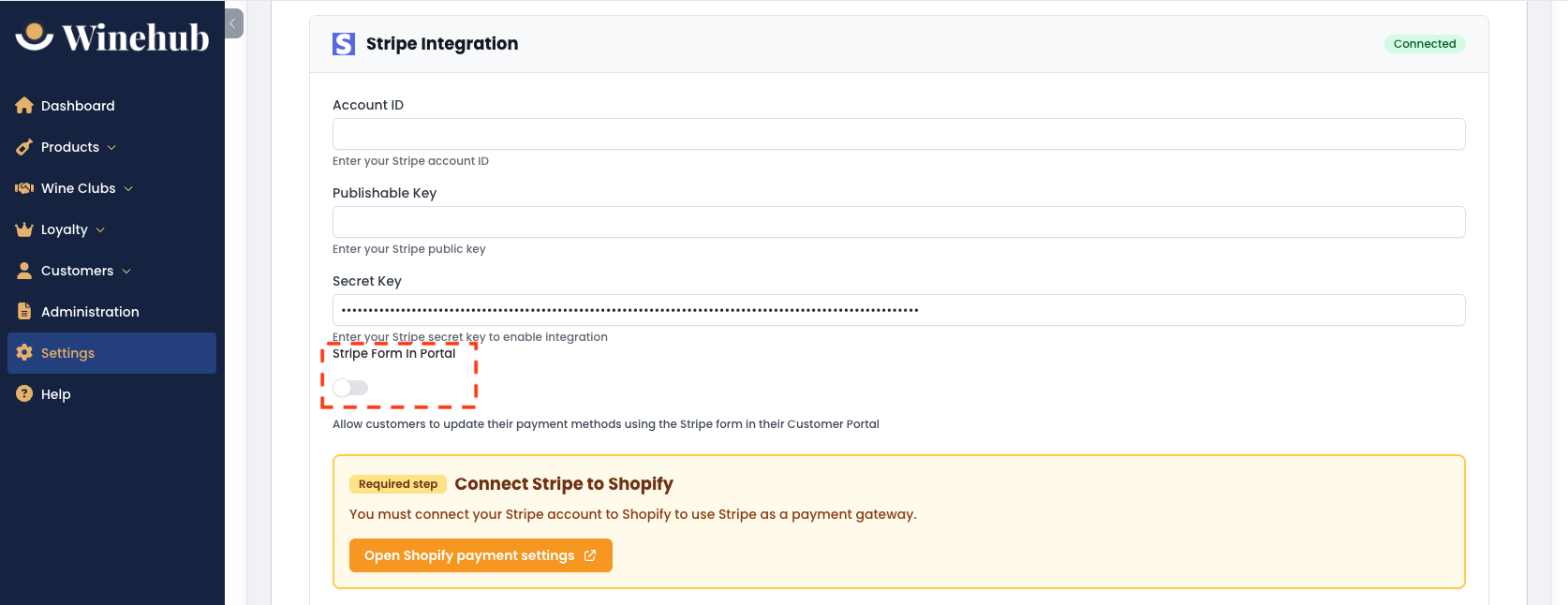
- Copy your Stripe Account ID, Publishable Key & Secret Key into the settings page in Winehub
- Connect Stripe to Shopify by clicking the orange button and follow the prompts to enable the Stripe gateway.
- Click Sync All Stripe Customers & Cards to Shopify in Winehub to complete your setup.

View more detailed instructions and screenshots in this Stripe Help Guide.

This method connects Stripe as a 'secondary' payment gateway for subscriptions only. You may still have a different payment gateway (eg. Shopify Payments) as your primary gateway in Shopify.
Stripe Form in Portal
By default, the Shopify customer portal allows customers to update existing saved payment methods only. It does not support collecting brand new card details if no valid payment method is currently vaulted. To address this, you can activate the Stripe Form within your customer portal to securely collect new card details from customers.
This is particularly useful when recovering failed migration customers. If a customer’s original payment method was not successfully migrated, you can send them to the portal to securely enter new card details before manually activating their subscription contract. This ensures compliance, reduces friction, and allows you to re-establish recurring revenue without handling sensitive payment data manually.
Stripe Form Setup
Use the toggle in the Stripe module to activate the Stripe Form in the Customer Portal. The form will show up under the Payment Methods tab.
Related Articles
Failed Payments
Winehub provides robust automation to help manage failed payment attempts for subscription orders, reducing manual follow-ups and improving club order success rates. VIDEO GUIDE: Billing Behaviour & Failed Payments Failed payments are only followed ...Payment Methods
Changing Club Payment Methods Customer Portal The customer can update their club payment method by logging into the customer portal on your website and clicking 'Payment Methods'. Shopify Admin In Shopify admin, open the Shopify customer record. In ...Manually Activating Subscription Contracts
During the migration process, it’s possible that a small number of member contracts may fail to activate automatically. If this occurs, you will be notified via email with a list of the affected contracts. In Winehub, unactivated contracts will ...Admin Club Sign-ups
This method for club signups is only possible if you use the third-party Stripe integration or if the customer's card is already vaulted in Shopify. Creating Club Subscriptions Without an Initial Transaction Default Shopify behaviour means that new ...Third Party Integrations
Winehub integrates with a range of trusted third-party platforms to extend the functionality of your store. These integrations support payments, compliance, inventory management, fulfilment, reservations and marketing, allowing you to connect Winehub ...