Delivery method pickup pickup option location is invalid
Issue
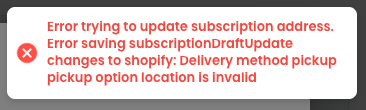
During a club run or when updating delivery preferences, you may receive an error advising that Delivery method pickup pickup option location is invalid.
Common Cause
The location selected for fulfilment of this subscription does not have Pickup enabled in the Shopify Settings.
How to Resolve
Open the location in Shopify Settings > Locations and ensure it is enabled to Pickup.
Related Articles
No Inventory Location Found or Enabled
Issue During a club run or rebilling a subscription, you may encounter advising No inventory location found or enabled. Common Cause The two main causes of this issue are: One or more of the products involved in the shipment does not have the correct ...Delivery Frequencies
Delivery frequencies define the schedule options you offer to customers when they join your wine club - such as Monthly, Quarterly, or Bi-Annually. You can add as many frequencies as you like, and there's no limit. For each frequency, you then choose ...Flip to Ship
Convert a wine club pickup order to shipping If a club member originally selected 'pickup' as their delivery option but needs their wine shipped instead, Flip to Ship lets you convert that order without recharging the customer. This process has been ...Failed Payments
Winehub provides robust automation to help manage failed payment attempts for subscription orders, reducing manual follow-ups and improving club order success rates. VIDEO GUIDE: Billing Behaviour & Failed Payments Failed payments are only followed ...Bulk Shipping Rate Swap
The Bulk Shipping Rate Swap tool allows you to quickly update shipping rates and carrier codes across multiple wine club subscriptions without editing each customer manually. This tool is ideal for: Updating shipping rates in bulk Changing shipping ...