Automatic Discounts
By default, Winehub discounts are applied manually. This means that unique discount codes are generated for each customer, accessible via their customer portal, and must be applied manually at checkout.
What Are Automatic Discounts?
Automatic discounts streamline the checkout process by applying eligible discounts without requiring a discount code. This feature allows club discounts and membership perks to be applied instantly when:
- A club member is added to a Shopify POS cart.
- A customer enters their email at Shopify checkout, even if they are not logged in.
By enabling automatic discounts, the following benefits can be applied seamlessly:
- Club Benefits & Loyalty Tier Discounts
- Exclusive Product Discounts
- Tier-Based Product Discounts
- Free Shipping Perks for clubs and tiers
The system will automatically apply the highest available discount for the customer based on their membership status.


Enabling Automatic Discounts
Settings > General Settings > Discounts
It may take some time for changes to propagate upon initial activation of Automatic Discounts. If discounts are not applying after a few hours, contact Winehub support for assistance.Important Considerations
Conflicts with Third-Party Apps
Some third-party Shopify apps and features may interfere with automatic discounts. If issues arise, disable automatic discounts and contact support.Exclusive Products Require ‘Dynamic Checkout Buttons’ to be Disabled
To ensure exclusive product discounts work correctly, disable dynamic checkout buttons in Shopify on your product template (you can still use Dynamic Checkout buttons in your checkout)
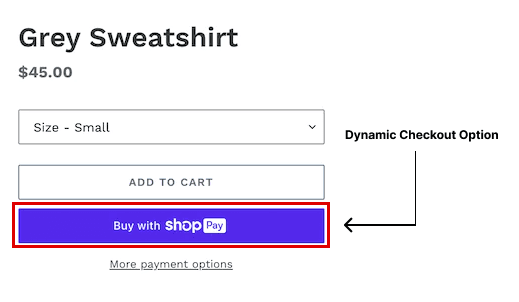
Using Additional Discounts Outside of Winehub
Winehub includes a complex discount engine to manage an array of discounts across many eCommerce sectors (e.g., Clubs, Loyalty, Allocations, Referrals, Subscriptions). If you apply other discount codes via Shopify or another app, there is a risk of conflicts or unexpected discount behavior.
If you want your discount to work in conjunction with Winehub's automatic discounts, you must set your discount code to "combinable." While we are able to assist with anything related to Winehub discounts, we are unable to provide support if you are trying to apply additional discounts outside of Winehub. You are welcome to do so, but it is at your own risk, and we strongly encourage extensive testing to ensure you achieve the desired result.
Switching Back to Manual Discounts
If needed, you can return to manual discount codes at any time by toggling off automatic discounts in the Discounts settings.
For further assistance, reach out to Winehub Support.
Related Articles
Combining Discounts
Winehub features a powerful discount management system designed to deliver the right offer to the right customer, while protecting your margins and simplifying operations across clubs, loyalty programs, and general eCommerce. How Discounts Are ...Case Size Discounts
Creating Case Size Discounts Once you set up your case sizes and delivery frequencies for your variable bottle club, you'll have the option to define case size discounts. To add a case size discount, scroll down to the Restrictions per Case Size ...Perk Cluster Discounts
Applying Bulk Discounts Using Clusters and Loyalty Tiers 1. Create a New Cluster Create a manual or dynamic Cluster. 2. Assign the Cluster to a Loyalty Tier Open the Loyalty section in WineHub. Select the desired tier and expand the Exclusive ...General Settings
General Settings is where you can configure and customise how your wine clubs, discounts, product bundles and other system settings work. Following is an overview of the settings that you can customise in each tab. VIDEO GUIDE: Reviewing General ...Shipment Addons
The Addons feature lets you add extra products to a wine club member's next upcoming order without altering their recurring subscription. Both the recurring club order and Addons are processed together in a single transaction. When enabled, Addons ...