Advanced Club Setup Guide
Winehub’s Advanced Mode enables highly customised wine clubs, tailored to your operational needs and customer preferences. Follow this guide to configure any of the four advanced club types: Fixed Case, Variable Case, Playlist, and Seasonal.
Club Type | Customer Choice | Billing Options | Effort | Common Use Case |
Fixed Case | No | Fixed Dates or Anniversary | Low | Simple, easy-to-manage clubs |
Variable Case | Yes | Fixed Dates or Anniversary | Low | Customer-selected cases |
Playlist | Optional (per shipment) | Anniversary Only | Medium | Gift subscriptions, curated wine journeys |
Seasonal | Optional (per shipment) | Fixed Dates Only | Medium | Seasonal releases, events |


Standard Setup Workflow
Step 1: Create a New Wine Club
- Navigate to Wine Clubs > Create New.
- Toggle to Advanced Mode in the top right.
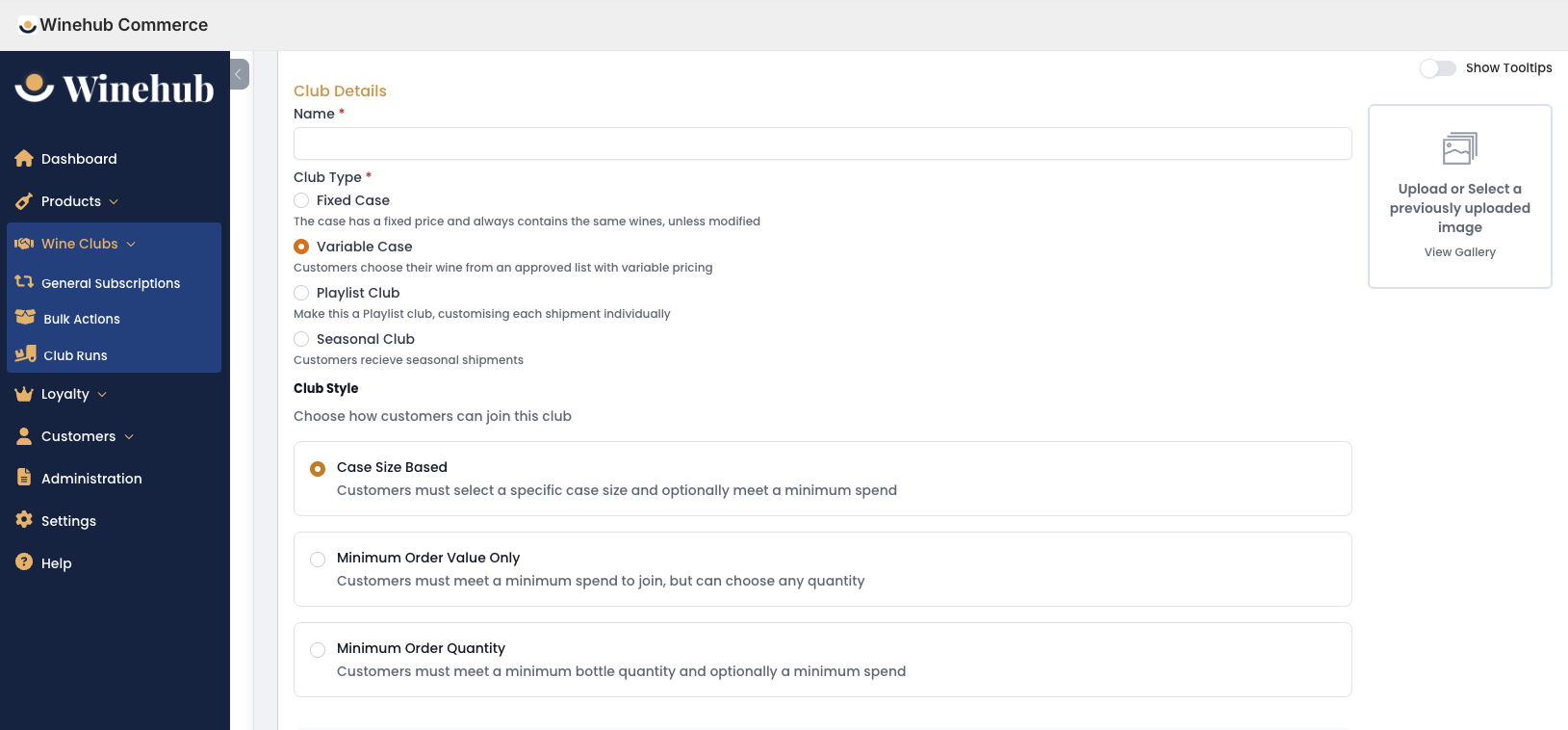
Enter your Club Name.
Upload a Club Image (this will be shown in your website’s signup app).
Select a Club Type:
Fixed Case: Price is fixed. Predefined cases, no customer changes.
Variable Case: Price is variable. Customers select bottles or cases.
Playlist: Curated shipments over multiple deliveries.
Seasonal: Shipments tied to calendar seasons.
If Variable Case:
Select Club Style:
Case Size Based (optional Minimum Order Value).
Minimum Order Value Only (MOV, no case size requirement).
Minimum Order Quantity (optional Minimum Order Value).
If Case Size Based, select available Case Sizes and upload images via Edit Case Sizes.
Step 2: Enter Club Details
Add a Description (optional).
Enter a Member Limit (optional).
Use the Published toggle to control visibility on your website.
Optional Toggles:
Allow Shipment Add-Ons (you can configure these in later steps).
Enable Additional First Order Purchases (configure these in Settings > Sign Up App Settings > Behaviour).
Allow Max Shipments (useful for gifting).
Go Directly to Checkout (Only used for clubs with no product or frequency choices)
Hide Frequency Downgrades (Variable Case & Variable Shipments only).
Hide Case Size Downgrades (Variable Case & Variable Shipments only).
Enable Club Shipping (be sure to setup your rates in Settings > Club Shipping Profile).
Step 3: Delivery Frequencies & Rebilling Setup
Click ‘Add Delivery Frequency’.
Add a Frequency Name (eg. Quarterly), Description (optional), and Image (appears in the signup app).
Repeat for each frequency (e.g., Monthly, Quarterly, Bi-Annual).
Rebilling Options by Club Type:
| Fixed/Variable | Fixed Dates or Customer Purchase Anniversary |
| Playlist | Anniversary Only |
| Seasonal | Fixed Dates Only (Managed through season configuration) |
If Using Fixed Rebilling Dates:
Add specific shipment dates using ‘Add Date’.
Define a Cut-Off Period to restrict last-minute order changes (defaults to 7 days).
If Using Anniversary Rebilling:
Define shipment intervals (e.g. every 3 or 6 months from customer signup date).
Step 4: Club Discounts & Pricing
Optionally apply a Club Discount to each frequency (applies to club shipments only).
Enable Custom Pricing after saving the club to define product-specific pricing by frequency.
Use the Visible on Sign Up toggle to show or hide frequencies.
Delete frequencies as needed.
Step 5: Club-Specific Product Configuration
Fixed Case Club
- Click ‘Add Existing Case’ (only cases can be added).
Apply Purchase Limits and Visibility Settings (hide from Customer Portal and/or Signup App as required).
After saving, reorder displayed products via ‘Show Index Value Editor’.
Variable Case Club
Click ‘Add Existing Product’ to include bottles and/or cases (products must be categorised as ‘Wine’ in Winehub).
Apply Visibility Settings as needed.
Configure Restrictions by Case Size (Optional):
Minimum Total Order Value (MOV).
Minimum/Maximum quantity of specific products.
Suggested product selections.
Playlist Club
Define how many shipments are included and click ‘Update Shipments’.
For each shipment, choose:
Fixed Case (preselected by winery).
Variable Case (customer selects bottles or packs).
If Variable Case:
Choose Quantity & (optional) MOV or MOV Only.
If using Case Size Based, define available case sizes via Edit Case Sizes.
Optionally tick ‘Show Future Shipments During Signup’.
Customise each shipment’s products and settings individually.
Seasonal Club
In Select Season Products, either:
Use default seasons via ‘Southern Hemisphere’ or ‘Northern Hemisphere’.
Or tick ‘Unlock Seasons’ to fully customise seasons.
For each season, choose Fixed Case or Variable Case products.
If Variable Case:
Select Quantity & (optional) MOV or MOV Only.
Configure case sizes via Edit Case Sizes.
Tick ‘Show Future Shipments During Signup’ to display upcoming seasons.
Optional – Enable Default Shipments:
Tick ‘Enable Default Shipments’ to override customer selections at renewal.
Define a Default Renewal Date when setting up default products.
Enforce default selections at signup using ‘Default Signup’.
Adjust Season Names, Start and End Dates, and Rebilling Dates for each shipment.
Step 5: Optional Features
Set Up Club Perks to add benefits beyond recurring club orders
Learn About Add-Ons to increase average order value
Add a Sign-Up Product Offer to increase sign-up order value
Configure Additional First Order Purchases to allow additional products to be added to the membership signup
Step 6: Save Your Wine Club
Related Articles
Basic Club Setup Guide
Winehub makes launching and managing your wine club easy. Whether you’re starting simple or diving into a highly tailored program, we’ve got you covered with Basic Mode and Advanced Mode. Before you begin, ensure that all products required for your ...Advanced Analytics
The Advanced Analytics feature uses sales data and WineHub’s rich product metafields to provide detailed sales analysis. While the Dashboard provides a topline overview of sales by wine club and/or loyalty tier, Advanced Analytics provides more ...Setup & Styling Service
Winehub is designed to be fully self-service, empowering you to manage your own wine club setup, loyalty programs, and app styling using our comprehensive Support Portal. However, for time-poor teams or those looking for a fast, polished launch, our ...Club Runs
The Club Runs section is where you can view and manage wine club subscription orders. WineHub automatically generates grouped orders for each specified shipping date based on the club and the selected frequency (fixed date or anniversary-based). For ...Club Perks
Wine clubs are about more than just wine; they often come with exclusive perks to entice members and add value. Winehub provides robust tools for customising club-specific perks, allowing you to assign them to all delivery frequencies or tailor them ...